
This article was originally written in portuguese and pusblished on the RBZ Digital’s blog, a brazilian WordPress and SEO software house. Don’t miss out their latest updates.
Even though WordPress 6.5 “Regina” had its launch delayed because of a bug in one of the new features, it was released to the market in early April, bringing various novelties to the world’s most used CMS. However, that is not really news – there were thousands of published posts covering the new update in detail weeks before the official release.
With that in mind, we from RBZ Digital decided to save your time by telling you what really matters in this new release and why you should at least try it. For this article, we have read a variety of content from diverse sources, which are available at the end of this publication in case you want to dive deeper in the subject.
Main news
Among the torrent of content produced on the matter, many articles and blog posts have classified this new version as a game changer, and I feel obliged to agree with them. This is mostly because the development team introduced a feature that is a dream come true to so many WordPress developers and administrators: auto update rollbacks. Check out all noticeable new features below.
Auto update Rollbacks
In my humble opinion, this is the real game changer from the 6.5 release. It was already possible to activate plugins auto updates with safety, as long as they were intermediated by a third party plugin. Incorporating the possibility of using auto updates for plugins and themes to the core may be the biggest achievement for the CMS in the last years because it fixes one of the most criticized WordPress problems.
- What it does: reverts themes and plugins malfunctioning updates, avoiding your website from breaking when a critical error is thrown. This makes the activation of the auto update feature viable, saving time and effort in maintaining the system;
- Why is it important: simplifies WordPress’ maintenance process;
- Who benefits from it: developers and administrators;
- Implementation: automatic.
Default AVIF support
The most interesting update for bloggers, news portals, and image-based portfolios. AVIF files can achieve up to 50% of the compression level of JPEGs without loss of quality and are supported by most modern browsers, except for some mobile browsers. Now, uploading images in this format is as simple as uploading a JPG or PNG.
However, the functionality requires extra configuration to work on multisite installations. You can check out more details here.
- What it does: allows upload of AVIF images without the need for third-party plugins;
- Why is it important: enables reduction of data volume occupied by images, especially on sites with recurring publications that tend to use images to illustrate their posts;
- Who benefits: webmasters, developers, administrators, editors, writers;
- Implementation: automatic.
Performance twice as fast as the previous version
With over 110 performance updates, the new version promises an impressive increase in speed and efficiency, both in the post editor and the site editor. According to the official page, loading is twice as fast as in version 6.4, with input processing speed up to five times faster than the previous version.
As a participant in the Contributor Mentorship Program maintained by WordPress.org, I had the chance to try out some release candidates, and I did feel a difference in performance (which I mistakenly attributed to the new settings on my personal computer). However, I only used the new version in test environments, with limited databases, few plugins, and restricted conditions. So, the performance gain claimed by the developers still needs to be confirmed in more complex scenarios.
- What it does: Improves CMS performance (reducing response time on all fronts);
- Why is it important: Enhances the overall system experience, from management to content consumption;
- Who benefits: Webmasters, developers, administrators, editors, writers;
- Implementation: Automatic.
Enhancement of plugins’ dependencies
The plugins’ dependencies feature aims to make the installation and activation process of addons (dependents) and the plugins they depend on (dependencies) consistent and easy. By defining the dependencies of a plugin, the system will enforce restrictions on the installation and activation of plugins until their dependencies are satisfied.
- What it does: Allows adding dependencies to a plugin, changing the conditions for installation and activation;
- Why is it important: Prevents plugins with dependencies from being independently used by administrators and site managers, avoiding errors and reducing system complexity;
- Who benefits: Developers, administrators;
- Implementation: Manual.
Block Bindings API
The new API allows linking native blocks to different data sources. This means it’s possible to link a paragraph with metadata from a post or link a header to data defined by PHP logic, all without the need to deal with React, block registration, among other custom block writing details for each new source you want to read.
Before the Block Bindings API, the only blocks that could benefit from external sources were custom blocks created with the @wordpress/scripts and @wordpress/create-block libraries, which required some work with React and PHP.
For now, the API only supports the Image, Paragraph, Header, and Button blocks, allowing data linking with some of their attributes. Despite supporting few blocks, developers say the API offers a “wide range of use cases,” and support will be extended to more blocks in the future.
- What it does: Allows linking Gutenberg’s native blocks to alternative data sources;
- Why is it important: Simplifies the process of displaying dynamic data on the frontend without the need for additional JavaScript on the site;
- Who benefits: Developers;
- Implementation: Manual.
API de Interatividade (Interactivity API)
The new API can also be considered a highlight of the version, but only in terms of block themes. This is because the Interactivity API was created so that developers can program blocks that react to changes in state in other blocks (hence the interactivity). On the API’s webpage, developers claim that its goal is to facilitate the development of rich interactive experiences for the user, ranging from simple cases like counters and pop-ups to page changes and instant searches.
- What it does: Allows the development of interactive blocks that react to state changes in other blocks;
- Why is it important: Enables the creation of highly interactive experiences, bringing more web application characteristics to WordPress 6.5 “Regina” without compromising performance;
- Who benefits: Developers, administrators, clients;
- Implementation: Manual.
Improved site editor
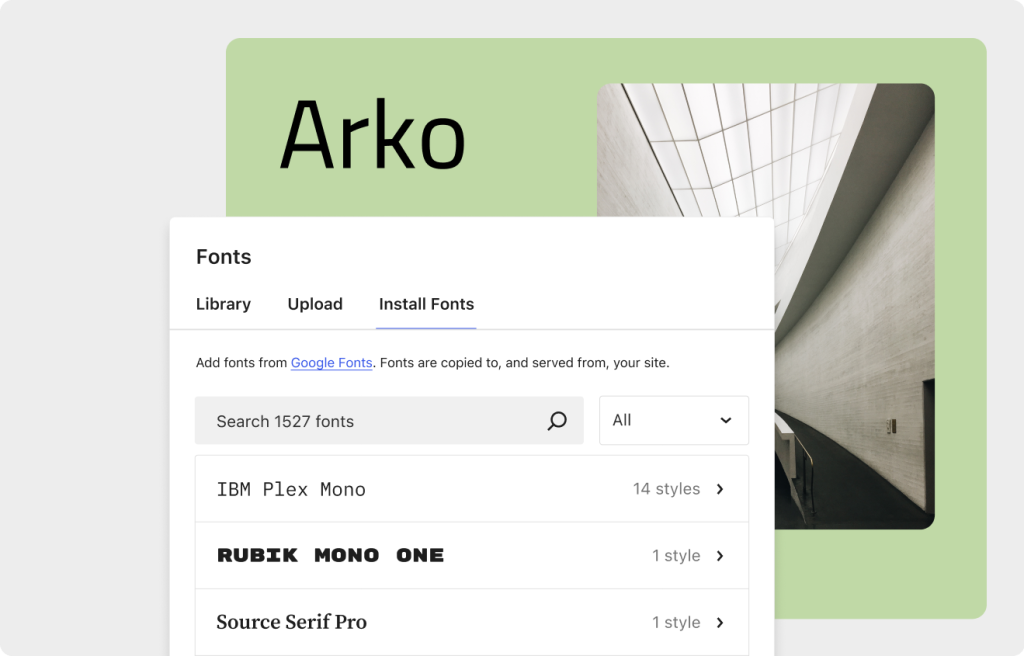
The block editor has also received improvements with the update. In addition to being faster, the post and page editor now integrates with the site editor, allowing users greater control over blocks. New ways of managing templates and patterns have also been introduced, along with the option to set the site icon in the Settings menu.
One of the highlights (and reason for the delay in release) is the introduction of native font management, created to comply with European data legislation but also to address a longstanding community demand, especially from non-developers, who can now control website typography through the site editor without the help of plugins and themes.
And for those who value organization, WordPress 6.5 brings simple and indispensable functionality. How many times have I found myself lost in a list of blocks where patterns are converted to stacked “groups” and felt disappointed for not being able to rename these groups. But things have changed! Now it is possible to rename block labels in the editor, allowing for more effective organization and navigation for everyone.
- What it does: Introduces performance and usability improvements in the site editor and the administrative panel;
- Why is it important: Addresses community demands and allows users more control over the design of their website;
- Who benefits: Developers, administrators;
- Implementation: Automatic.
Summarizing
WordPress 6.5 “Regina” brings improvements and new features that justify its claim as a standout release, but not everything is perfect. While automatic update rollbacks are a dream come true, it’s still early to configure all themes and plugins for this. Of course, developers are not irresponsible enough to release an untested product, but each case is unique. It’s always a good idea to test updates in a local environment before implementing them in production.
Precautions aside, we can expect a faster admin panel and site editor, with new features for organization and development. Administrators and designers can benefit greatly from the built-in local font management, as well as find it easier to manage editing by renaming blocks as needed.
Native support for AVIF also deserves special mention, as it can address another major issue with WordPress, which is excessive data volume caused by image files. Site maintainers for e-commerce sites, news portals, blogs, and portfolios can benefit from this new functionality by saving storage space on new uploads. With this in mind, we can expect image converter plugins to start providing the AVIF option more prominently, making the functionality even more impactful.
The new version also brought exclusive updates for developers. The Interactivity and Binding APIs promise to transform block development, extending their applications and possibilities. But again, not everything is perfect. Since these APIs are dedicated to developers, other professionals working with WordPress may be confused about their use, and if the developer’s excitement takes over, the complexity of the system can escalate too much, making maintenance difficult. So, if you want to use them, remember to assess the client’s needs and the possible impact of interactive blocks before implementing them in production.
References
- Oficial release page
- Guia de Campo da nova versão
- Notas do desenvolvedor
- API de Interatividade
- Demonstração da API de Interatividade
- API de Vinculação de Blocos
- Melhorias na performance para o registro de variações de bloco
- Dependências de Plugins
- Suporte AVIF
- Aumento de performance em traduções
- Rollback de atualizações automáticas será incluído na nova atualização do WordPress?
- Atualização automática de temas e plugins
- O que há de novo na nova atualização: Biblioteca de fontes, dataViews, block bindings, API de Interatividade e Muito Mais!
- Atualização do WordPress tem o lançamento atrasado por bug
- WordPress.org – Versão 6.5 adiada por conta do bug no sistema de fontes
- WordPress deixa a navegação do seu site mais rápida
- O WordPress “Regina” chegou – principais funcionalidades e mudanças